
Learning how to claim a business on Google Maps opens the door to strengthening your online presence. The verification and management process gives business owners full control over responding to reviews, updating business information, and building customer trust.
This strategy helps businesses stand out in local search results while significantly increasing conversion opportunities. Start optimizing your Google Business Profile today so your business becomes easier to find and more trustworthy in today’s digital marketplace.
What Is Claiming a Business on Google Maps?
Claiming a business on Google Maps is the verification process that confirms someone is the legitimate owner or authorized representative of a business already listed on Google’s platform.
Once the verification process is complete, the business owner gains access to Google Business Profile (formerly Google My Business), a dashboard used to manage all business information.
Through this dashboard, business owners can update their business details, upload photos, add services, and interact directly with customers on both Google Maps and Google Search.
Benefits of Claiming a Business on Google Maps
Managing and securing your Google Business Profile is a strategic step toward strengthening your digital presence. It offers numerous advantages that directly impact business visibility and growth.
1. Increases Credibility and Customer Trust
Businesses that officially manage their profiles create a more professional image in the eyes of potential customers.
Verified business information gives customers greater confidence before making purchasing decisions.
When a profile displays positive reviews, relevant photos, and consistent business information, customer trust increases significantly. Google Maps becomes an important first point of interaction between businesses and potential customers.
2. Makes Your Business Easier to Find in Local Search
A claimed business profile helps Google’s system better understand and display your business for relevant local searches.
For example, when users search for terms like “SEO services” or “SEO services near me,” Google is more likely to prioritize businesses with complete, verified, and actively managed profiles.
This increases your chances of attracting new customers through local search results.
3. Gives You Full Control Over Business Information
Claiming your business provides complete control over the information displayed publicly.
This allows you to ensure that customers always see accurate and up-to-date information.
Business owners can manage:
- Business name and category
- Complete business address with an accurate map pin
- Business hours, including holiday schedules
- Phone number, website, and business description
- Product, interior, and service photos
Consistently maintaining this information helps create a more trustworthy and professional business image.
4. Supports Local SEO Strategy
Actively managing your Google Business Profile plays an important role in Local SEO (Search Engine Optimization).
When business owners regularly update their profiles, upload photos, and interact with customers, Google considers the profile active and relevant.
This improves the likelihood of appearing at the top of local search results, especially when users search for services near your business location.
5. Makes It Easier to Receive and Respond to Customer Reviews
After claiming your business profile, you can manage customer reviews directly.
This capability is essential for building long-term customer relationships.
You can:
- Respond to positive reviews as a gesture of appreciation.
- Address negative reviews professionally with constructive solutions.
- Encourage satisfied customers to leave ratings and share their experiences.
- Answer customer questions through the Q&A section.
Active engagement demonstrates that your business values customer feedback and strengthens your online reputation.
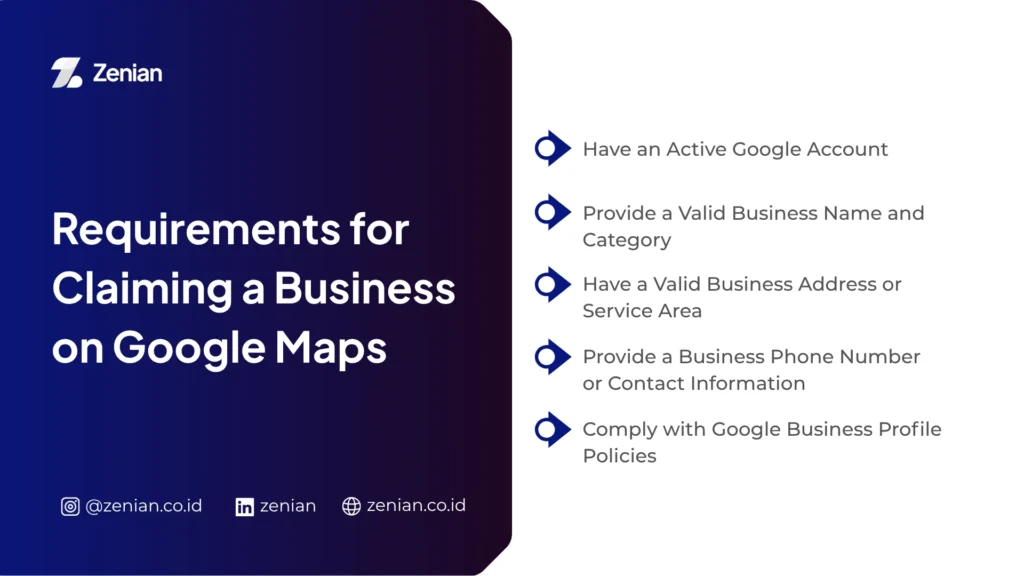
Requirements for Claiming a Business on Google Maps
Before beginning the verification process, make sure your business meets the following basic requirements.
1. Have an Active Google Account
You must use an active Google (Gmail) account to access Google Business Profile.
This account serves as your primary identity for managing business information, responding to customer reviews, and monitoring business performance.
2. Provide a Valid Business Name and Category
Your business name should match your official business identity, such as the name displayed on your storefront or legal documents.
You should also choose the most appropriate business category so Google can correctly classify your business and display it to relevant audiences.
3. Have a Valid Business Address or Service Area
Every business should provide a complete and accurate physical address, including street name, building number, and postal code.
You should also place an accurate map pin to help customers locate your business.
If your business does not operate from a physical storefront, you should define a specific service area instead.
4. Provide a Business Phone Number or Contact Information
Google requires an active phone number that customers can use to contact your business.
Many customers prefer contacting businesses directly before visiting.
Additionally, this phone number may be used to receive verification codes during the ownership verification process.
5. Comply with Google Business Profile Policies
You must prove that you have legitimate rights to manage the business before Google approves your claim.
Google may verify ownership through:
- Postcard verification
- Email verification
- Phone verification
In certain situations, Google may also request supporting legal documents such as:
- Business licenses
- Business registration certificates
- Tax identification documents
- Utility bills
These documents help confirm legitimate ownership.
Also Read: 6 Ways to Register a Shop on Google Maps: A Complete Guide!
How to Claim a Business on Google Maps
Claiming a business profile allows business owners to officially take control of and manage their listings.
The process is completed through several verification steps.
1. Search for Your Business Profile on Google Maps
The first step is determining whether your business already exists on Google Maps.
Open Google Maps using the mobile app or a web browser, then search for your business name.
If your business appears, Google has already created the listing either automatically or through user contributions.
If it doesn’t appear, you’ll need to create a new listing by selecting “Add a missing place.”
At this stage, make sure the business category and location are accurate.
2. Select “Claim This Business”
After locating your business profile, sign in using the Google account you want to use as the primary administrator.
On the business profile page, click “Claim this business” or “Own this business?”
If the business is already managed by someone else, Google will display “Request Access” instead.
In this case, Google will require approval from the current owner or additional verification before granting access.
3. Complete Your Business Information
After initiating the claim process, Google Business Profile will prompt you to complete your business information.
Ensure all information accurately reflects your business.
Required information typically includes:
- Official business name
- Primary business category
- Complete business address and accurate map pin
- Business hours
- Active phone number
- Business website (if available)
Providing accurate information significantly improves your performance in local search results.
4. Verify Business Ownership
Google requires ownership verification before granting full access to your profile.
Available verification methods may include:
Phone or SMS Verification
A verification code is sent directly to your registered business phone number.
Email Verification
Google sends a verification code to your registered business email address.
Postcard Verification
Google mails a verification code to your business address.
This process usually takes 7–14 days.
Ownership Appeal
If another person currently controls your listing, Google may ask you to submit supporting legal documents, such as:
- Business license
- Business registration certificate
- Utility bill
These documents help verify legitimate ownership.
Verification serves as an essential security measure to prevent unauthorized access to business profiles.
How to Claim a Google Maps Business Already Owned by Someone Else
If another person such as a former employee, previous agency, customer, or even a competitor—currently manages your business profile, Google provides an official process for reclaiming ownership.
1. Submit an Ownership Access Request
Begin by submitting a formal ownership request through Google Business Profile.
Steps include:
- Sign in using the Google account you intend to use.
- Search for your business name or address.
- Select “Claim this business” or “Request Access.”
- Complete the ownership request form with accurate information and explain your legitimate relationship with the business.
Google will notify the current profile owner.
2. Wait for the Current Owner’s Response
Google acts as the intermediary during this process.
Typically:
- Google emails the current owner about your request.
- The owner has approximately 3–7 days to respond.
- If approved, ownership is transferred immediately.
This process protects businesses from unauthorized ownership transfers.
3. If Your Request Is Rejected or Ignored
If the current owner rejects your request or fails to respond, Google provides additional options.
No Response
After the waiting period expires, Google may allow you to complete an additional verification process by providing supporting ownership evidence.
Request Rejected
You can submit a formal appeal to Google.
To strengthen your appeal, prepare supporting documentation such as:
- Business registration documents
- Business license
- Tax identification number
- Utility bills registered under the business name
- Photos of your storefront showing business signage
- Screenshots of your official website or social media accounts
Once Google verifies these documents and confirms your ownership, it can revoke the previous owner’s access and grant full management rights to the legitimate business owner.
This verification process ensures that only authorized individuals can manage business profiles on Google Maps.
Optimize Your Google Business Profile with Zenian
Claiming your business on Google Maps is only the first step toward building a strong digital presence and increasing customer trust. Simply owning the profile isn’t enough you must continuously optimize it, keep business information up to date, and leverage analytics to better understand customer behavior.
PT Zenian Digital Lab is your strategic partner for optimizing your Google Business Profile through structured Local SEO strategies. Don’t let your competitors capture valuable local customers. Contact our team today and start maximizing your business visibility and growth.
Also Read: Local SEO Strategy: How to Increase Local Business Visibility