
Knowing how to register a shop on Google Maps is a crucial step for business owners who want to be easily found by customers. Nowadays, many people search for products or services directly through Google, especially using location-based keywords like “coffee shop near me” or “nearest AC repair”. If your business is not registered yet, you could completely miss out on potential customers.
Through the right local SEO strategy, Google Maps not only helps customers locate your shop but also boosts your business credibility in online searches. This article will discuss how to register a shop on Google Maps, its benefits for businesses, and tips to get your business profile approved quickly.
What is Google Maps for Business?
Before diving into the registration process, it is important to understand how Google Maps works to support the growth of local businesses.
Understanding Google Maps and Google Business Profile
Google Maps is a digital navigation service by Google that helps users find locations, routes, and business information around them. For business owners, Google provides a service called Google Business Profile (formerly Google My Business), which allows businesses to appear in Google Search and Google Maps results.
When customers search for a specific business name or service, Google can display vital information such as the address, phone number, operating hours, customer reviews, and directions to the shop’s location.
The Relationship Between Google Maps and Local SEO
Google Maps is closely linked to local SEO, or location-based search engine optimization. Local SEO helps businesses appear in local searches, especially when users look for services in a specific area.
For example, when someone types “nearest meatballs” or “salon in South Jakarta”, Google will display relevant local business recommendations through Maps. The more optimized your business profile is, the higher your chances of appearing in those searches.
Why Must a Business Be Registered on Google Maps?
Businesses registered on Google Maps have a higher chance of being discovered by customers. Furthermore, a complete business profile helps build trust because customers can directly view reviews, photos, and shop information.
Moreover, consumer behavior today increasingly relies on online searches before purchasing a product or visiting a specific location.
Benefits of Google Maps for Business
Google Maps is not just a navigation tool; it is also an effective digital marketing medium for businesses.
1. Increases Business Visibility in Local Searches
One of the main benefits of Google Maps is increasing the chances of your business appearing in local search results. This helps your shop reach an audience that actively needs your related services or products.
2. Makes It Easier for Customers to Find Your Shop Location
Customers can directly use navigation to head to your shop without needing to ask for directions manually. This is highly beneficial, especially for retail businesses, restaurants, clinics, or other local services.
3. Boosts Business Trust and Credibility
Businesses with a complete profile tend to look more professional. The presence of customer reviews, star ratings, location photos, and operating hours provides a sense of security for potential customers before they visit.
4. Supports Local SEO Strategies
Google Maps is a core element of local SEO strategies as it helps improve business relevance for location-based searches.
5. Helps Increase Traffic and Sales
The easier it is for customers to find your business, the higher the chances of getting direct visits, phone calls, and transactions.
Read Too: Local SEO Strategy: How to Increase Local Business Visibility
Preparations Before Registering a Shop on Google Maps
Before you start registering your shop, here are a few things to prepare so the process runs smoothly:
1. Prepare a Consistent Shop Name
Use your actual business name and keep it consistent with the identity used across social media, websites, and marketplaces.
2. Determine the Right Business Category
Categories help Google understand your type of business for example, a restaurant, clinic, furniture store, or digital marketing agency.
3. Prepare an Active Address and Phone Number
Ensure the business address is clear and the phone number is active so customers can contact your business easily.
4. Set Up a Google Account for Business
You need an active Google account to create and manage your business profile professionally.
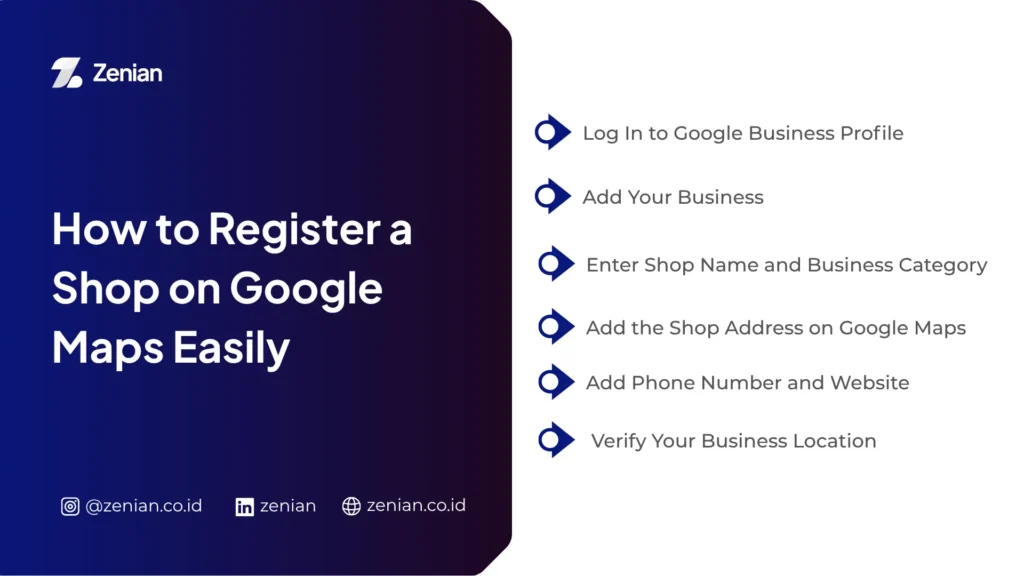
How to Register a Shop on Google Maps Easily
Here are the practical steps to register your shop on Google Maps:
1. Log In to Google Business Profile
Sign in to the Google Business Profile platform using your business Google account.
2. Add Your Business
Click the “Add your business to Google” menu, then start filling in your business information step-by-step.
3. Enter Shop Name and Business Category
Input your shop name according to your business identity and choose the most relevant category.
4. Add the Shop Address on Google Maps
Fill in the complete address, including the street name, city, and postal code. Ensure the location pin is accurate so customers can easily find your business.
5. Add Phone Number and Website
Add an active contact number and your website URL if available. This information helps boost business credibility.
6. Verify Your Business Location
Google usually requires a verification process via postcard (mail), phone, email, or video verification to ensure that the business is truly owned by you.
How to Register a Shop Name on Google Maps for Quick Approval
To make your business profile pass verification easily, keep the following tips in Zenian:
1. Use Your Real Business Name
Avoid using excessive or manipulative extra words.Correct Example: Zenian Digital Marketing Incorrect Example: Zenian No.1 Cheap SEO Services Jakarta
2. Avoid Keyword Stuffing in the Shop Name
Adding too many keywords to your business name can be flagged as spam by Google.
3. Complete Your Business Profile Information
Fill out the profile completely, including operating hours, business description, phone number, website, and business category.
4. Upload High-Quality Shop Photos
Add photos of the exterior, interior, products, and business activities to increase credibility and look more appealing in search results.
Knowing how to register a shop on Google Maps is an essential step to increase your business visibility online. With a complete business profile, customers can easily find your location, contact your business, and leave positive reviews.
Additionally, implementing a local SEO strategy through Google Maps can help your business perform optimally in local searches and boost conversion opportunities.
Optimize Your Local Business with Zenian
Want your business to be easily found on Google Maps and appear in local searches? PT Zenian Digital Lab is ready to help through our Local SEO and Google Business Profile optimization services to make your business more visible, trusted, and capable of driving more potential customers. Consult with us today!
Read Too: 5 Ways to Register a Location on Google Maps: Complete Guide!