

Creating an online store with WordPress has become easier than ever, allowing you to start a digital business without any coding skills. With its flexible platform, anyone can build a professional e-commerce website.
However, achieving the best results requires following the right steps. This guide explains the process in a beginner-friendly way so you can create an attractive, competitive online store that supports long-term business growth.
What Is an E-commerce Website?
An e-commerce website is a website that enables businesses to sell products or services online. Customers can browse product catalogs, read detailed information, add items to a shopping cart, and complete secure payments.
Having an online store allows businesses to reach customers from different regions. It also serves as a digital storefront that operates 24/7, allowing customers to shop anytime.
Preparing Before Building an Online Store
Before creating your website, there are several important preparations to ensure the process runs smoothly. Proper planning also makes your online store easier to manage after launch.
1. Decide What Products You Will Sell
The first step is determining which products you want to offer.
You can sell various types of products, including:
- Physical products such as clothing, food, and household items.
- Digital products such as e-books, templates, software, or online courses.
Display your best-selling or featured products on the homepage so visitors immediately see your top offerings. This strategy attracts attention and encourages customers to explore your catalog further.
2. Choose a Domain Name and Hosting
Once you’ve selected your products, the next step is preparing your domain name and web hosting.
A domain name is your website’s address, such as www.yourstore.com. Choose a domain that is short, memorable, and reflects your brand identity.
Web hosting stores all of your website’s files, including:
- Product images
- Videos
- Databases
- Business email accounts
You should also install an SSL (Secure Sockets Layer) certificate to encrypt data transmitted between your website and customers. SSL helps protect sensitive information during online transactions and builds customer trust.
3. Prepare Product Content and Images
Complete and engaging product information significantly increases the likelihood of making sales.
Prepare the following before publishing your website:
- High-quality product photos with proper lighting and multiple viewing angles.
- Clear, informative product descriptions highlighting key features and benefits.
- Product pricing, categories, weight, and dimensions for shipping calculations.
- SKU (Stock Keeping Unit) codes for easier inventory management.
The more complete your product information is, the easier it becomes for customers to make purchasing decisions.
4. Choose a Responsive WordPress Theme
Your WordPress theme determines your website’s appearance and user experience.
Choose a responsive theme that displays properly on:
- Desktop computers
- Tablets
- Smartphones
WordPress offers thousands of free and premium themes suitable for different business needs.
In addition to attractive design, choose a theme that offers:
- Fast loading speed
- Easy customization
- Regular security and feature updates
How to Create an Online Store Using WordPress
After preparing your domain, hosting, and SSL certificate, you can begin building your online store.
Follow these steps in order to create a fully functional e-commerce website.
1. Install WordPress
WordPress serves as the foundation of your online store.
Most hosting providers offer one-click installation, making the process quick and simple.
Installation steps:
- Log in to your hosting control panel (cPanel).
- Open Softaculous App Installer or another one-click installer.
- Select WordPress, then click Install Now.
- Enter your website name, administrator username, and password.
- Click Install and wait for the process to complete.
Once installation finishes, you can log in to the WordPress dashboard and begin configuring your website.
2. Install the WooCommerce Plugin
WordPress doesn’t include e-commerce functionality by default.
To turn your website into an online store, install WooCommerce.
Installation steps:
- Open the WordPress Dashboard.
- Navigate to Plugins → Add New.
- Search for WooCommerce.
- Click Install Now.
- After installation, click Activate.
WooCommerce will automatically launch its setup wizard to help configure your store.
3. Configure Store Information
Before selling products, complete your store’s basic information.
Important settings include:
General Settings
Go to:
WooCommerce → Settings → General
Configure:
- Store location
- Currency
- Business information
Website Identity
Go to:
Settings → General
Set:
- Store name
- Website tagline
Homepage
Create a homepage, then go to:
Settings → Reading
Select it as your site’s homepage.
Proper configuration makes your online store look more professional and easier for customers to navigate.
4. Add Products to Your Website
Once your store is configured, begin adding products.
Navigate to:
Products → Add New
Then complete the following information.
Product Information
Enter:
- Product name
- Product description
Product Data
Configure:
- Price
- Category
- SKU under the Inventory section
Product Images
Upload a high-quality primary image using:
Set Product Image
Add additional photos through:
Product Gallery Images
Digital Products
If you sell digital goods or services, enable:
- Downloadable
- Virtual
WooCommerce will automatically adjust the purchasing process.
Detailed product pages increase customer confidence and improve conversion rates.
5. Configure Payment and Shipping Methods
Your online store cannot process orders until payment and shipping are properly configured.
Shipping Settings
Go to:
WooCommerce → Shipping
Configure:
- Shipping zones
- Shipping rates
- Weight-based shipping
- Location-based shipping
Payment Methods
Enable your preferred payment options, such as:
- Bank transfer
- Credit cards
- Digital wallets
- Other payment gateways
Proper payment and shipping configuration improves the shopping experience and builds customer confidence.
6. Publish Your Online Store
Before launching your website, perform a complete review.
Ensure:
- Every product has complete information.
- Images display correctly.
- All menus function properly.
- SSL is active.
- Checkout works correctly.
After confirming everything is ready, publish your products and pages.
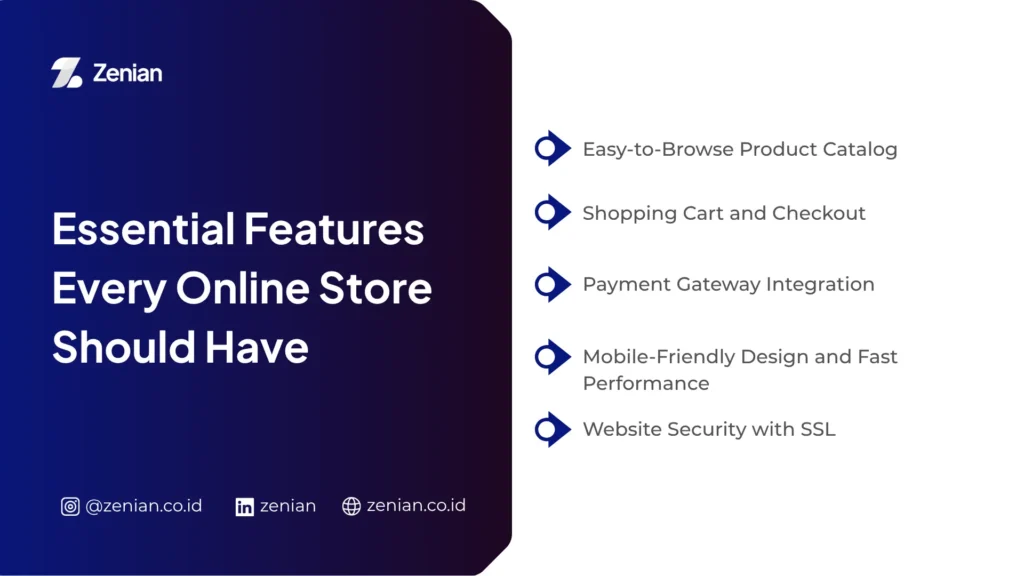
Essential Features Every Online Store Should Have
Each feature plays an important role in helping customers browse products, complete purchases, and enjoy a smooth shopping experience.
1. Easy-to-Browse Product Catalog
Your product catalog acts as your digital storefront.
Organize products using categories and tags so customers can quickly find what they need.
Each product page should include:
- Clear product title
- Transparent pricing
- Detailed product description
- Available sizes, colors, or variations
- High-quality images from multiple angles
A well-organized catalog improves both usability and customer trust.
2. Shopping Cart and Checkout
A shopping cart allows customers to save multiple products before purchasing.
Customers can:
- Adjust quantities
- Remove products
- Compare items
The checkout process should remain as simple as possible.
WooCommerce automatically creates:
- Shopping Cart
- Checkout
- Customer Account
- Order Confirmation pages
These features streamline transactions while creating a professional shopping experience.
3. Payment Gateway Integration
Offering multiple payment methods improves customer convenience.
Integrating a payment gateway enables secure, automated payment processing.
Common payment methods include:
- E-wallets
- Virtual Accounts (bank transfers)
- Credit cards
- Debit cards
- Retail payment outlets
Payment gateways also automate payment verification, making order processing more efficient.
4. Mobile-Friendly Design and Fast Performance
Most online shoppers browse using smartphones.
Your website should therefore be fully responsive across all screen sizes.
Loading speed is equally important because slow websites often increase bounce rates.
To improve website performance:
- Use a lightweight WordPress theme.
- Choose high-performance hosting.
- Optimize image sizes.
- Install caching plugins.
Fast websites improve both user experience and SEO performance.
5. Website Security with SSL
Security should never be overlooked since online stores manage sensitive customer information.
Installing an SSL (Secure Sockets Layer) certificate encrypts communication between your server and visitors.
SSL provides several benefits:
- Protects customer data during transactions.
- Reduces the risk of data theft.
- Increases customer trust.
- Supports SEO because HTTPS is a Google ranking factor.
Also Read: Types of CMS: Definition, Functions, and How to Choose the Right One
Examples of Websites You Can Build with WordPress
WordPress supports many different types of websites.
1. Company Profile Website
A company profile website helps businesses establish their online identity and build credibility.
Typical pages include:
- About Us
- Services or Products
- Contact Page
These pages make it easier for customers to learn about your business.
2. Blog Website
WordPress originally started as a blogging platform.
It provides powerful tools for:
- Writing articles
- Editing content
- Scheduling posts
- Organizing posts with categories and tags
Because of these capabilities, WordPress remains one of the most popular platforms for bloggers, online publishers, and content marketing.
3. Portfolio Website
WordPress is also ideal for showcasing professional work.
Portfolio websites are commonly used by:
- Graphic designers
- Photographers
- Illustrators
- Architects
- Writers
- Freelancers
Besides displaying projects, you can include:
- Project descriptions
- Client testimonials
- Contact forms
4. WooCommerce Online Store
One of WordPress’s greatest strengths is its ability to become a full-featured e-commerce platform through WooCommerce.
With thousands of themes and plugins available, WordPress can support businesses ranging from small startups to large enterprises.
As your business grows, you can easily add new features without changing platforms.
Tips for Optimizing Your Online Store
Optimization improves both search engine visibility and customer experience.
1. Optimize WordPress SEO
Search Engine Optimization (SEO) helps your website rank higher in search engines and attract long-term organic traffic.
You should also build high-quality backlinks to strengthen your website’s authority and improve rankings for both product pages and blog content.
2. Write Informative Product Descriptions
Product descriptions help customers understand your products before purchasing.
Include:
- Product name
- Specifications
- Features
- Benefits
- Usage instructions
- Competitive advantages
Complete information increases customer confidence.
3. Use High-Quality Product Images
Visual presentation strongly influences purchasing decisions.
Use:
- Sharp, well-lit primary images
- Multiple product angles
- Lifestyle photos showing products in use
- Detail shots highlighting important features
Professional images enhance credibility and increase conversions.
4. Improve Website Speed
Website speed directly impacts customer satisfaction.
To improve loading performance:
- Choose fast hosting (such as cloud hosting).
- Use lightweight themes.
- Compress images.
- Enable caching.
- Remove unnecessary plugins.
Fast websites provide smoother shopping experiences from browsing through checkout.
5. Use Google Analytics and Google Search Console
Google Analytics helps monitor:
- Website traffic
- Visitor behavior
- Traffic sources
- Conversion rates
Google Search Console helps monitor:
- Keyword performance
- Search visibility
- Indexing issues
- Overall SEO performance
Using both tools together enables continuous optimization based on real performance data.
Build a Professional Online Store with Zenian!
Building an online store is only the first step. To generate consistent sales, your website also needs strong SEO, excellent performance, and an effective digital marketing strategy.
If you’re looking to build a fast, modern, SEO-friendly e-commerce website, PT Zenian Digital Lab is ready to become your trusted digital partner.
Through our SEO services, website development, digital platform optimization, and customized marketing strategies, we help transform website traffic into qualified leads and sustainable business growth. Contact the Zenian team today to discuss your business goals.
Also Read: How to Create a Free Blog: A Complete Guide for Beginners