

There are several easy ways to check a website’s SEO. Conducting an audit is a crucial step to understanding whether your site can effectively compete in Google search results and helps you uncover various hidden issues affecting overall performance.
This check also ensures every element works optimally to maximize your chances of securing higher rankings. Understanding your website’s current health makes it easier to determine the right optimization strategy while boosting your organic traffic potential.
What is Website SEO?
SEO (Search Engine Optimization) is the process of optimizing a website so that search engines can easily find, understand, and display its pages in search results.
- Through this strategy, you can increase both the quality and quantity of organic traffic without relying entirely on paid ads.
- It helps your website stay relevant to user needs while remaining competitive in an increasingly fierce digital market.
- Implementing SEO requires careful attention to content, website structure, page speed, and overall user experience.
When all these elements work seamlessly, search engines can easily index your pages, giving you a significantly better shot at higher rankings.
Why is SEO Important for Business?
Search engine competition continues to evolve alongside the rising use of Artificial Intelligence (AI) technologies. Many users now leverage AI-powered search engines to get faster, more relevant answers. Because of this, unoptimized websites risk becoming invisible, losing out on valuable opportunities to reach potential customers.
The relationship between SEO and Google ranking is incredibly tight. Search engines evaluate various website aspects, ranging from technical performance and HTTPS security to mobile-friendliness and content quality. This evaluation reflects the website’s health through various SEO score indicators the better the optimization results, the higher the chances your pages will land at the top of search results.
The Core Functions of SEO for Websites
SEO delivers benefits far broader than just boosting a website’s position on Google. Here are some of the main functions of SEO:
1. Increasing Search Engine Visibility
SEO helps websites appear in relevant search results, making them easier for potential visitors to find. Optimization in Technical SEO creates a cleaner website structure, making it easier for search engine bots to crawl pages and speed up the indexing process. Better visibility translates directly into higher click-through rates from users.
2. Driving High-Quality Organic Traffic
An SEO strategy allows websites to attract visitors naturally without relying heavily on paid advertising. By conducting keyword research tailored to the audience’s needs, a website can attract users who are actively searching for the exact information, products, or services offered. This makes the incoming traffic highly relevant with a higher conversion potential.
3. Boosting Credibility and User Trust
Websites that successfully secure top search positions are generally more trusted by users. This trust grows stronger when the website offers a secure experience via SSL certificates, fast loading times, and accurate, easy-to-understand information. These factors give visitors the confidence to interact or complete transactions.
4. Increasing Leads and Business Conversions
SEO doesn’t just focus on visitor counts; it also helps turn traffic into tangible business opportunities. Content that aligns with user search intent answers their needs more precisely. Combined with a seamless user experience, a website can boost its conversion rate, generate more leads, and drive consistent revenue growth.
5. Delivering Long-Term Results
Unlike paid ads that stop generating visitors once the budget runs out, SEO offers sustainable, long-term benefits. As long as the website is consistently updated and optimized, pages that have earned good rankings can keep pulling in organic traffic and generating leads without any additional cost per click.
Also Read: The Difference Between SEO On Page and SEO Off Page and Benefits
How to Check Website SEO
This process allows you to find various obstacles, from technical issues and loading speeds to content quality that impacts search engine performance. Here is how to check website SEO:
1. Check Website Indexing on Google
The first step is to ensure your website pages are actually in Google’s database. Unindexed pages won’t show up in search results, making organic traffic impossible.
You can check your indexing status via Google Search Console under the Page indexing / Coverage report. From there, you can identify which pages are successfully indexed and which ones are facing issues. If your website has a large volume of pages, you can also use a Google Index Checker to speed things up.
2. Use Google Search Console
Google Search Console (GSC) is a must-have free tool to monitor your website’s SEO performance. The platform provides various reports that help you see exactly how Google crawls and indexes your pages. GSC also helps you:
- Monitor technical website health.
- Uncover crawling and indexing bugs.
- View keyword performance in search results.
- Identify pages that need optimization.
Leveraging this data allows you to fix issues quickly before they hurt your performance.
3. Analyze Traffic-Driving Keywords
Knowing which keywords bring in visitors helps you build a more effective content strategy. You can view this data in GSC’s Performance menu.
For a deeper analysis, you can turn to third-party tools like Ubersuggest or SEMrush. Both provide search volume metrics, keyword competition levels, and traffic estimates per keyword to guide your content planning.
4. Check Website Speed
Website speed is a critical SEO factor because it shapes user experience and search engine indexing. Slow sites drive users away quickly, inflating your bounce rate.
Use Google PageSpeed Insights to measure performance on both mobile and desktop. The tool gives immediate actionable recommendations like:
- Compressing image sizes.
- Eliminating unnecessary scripts.
- Leveraging browser caching.
- Optimizing server response times.
5. Audit On-Page SEO
On-Page SEO focuses on internal website elements. Optimizing these helps search engines understand page content while giving users a better experience. Key aspects to check include:
- Meta Title & Meta Description: Keep them natural, include keywords, and maintain optimal lengths to boost Click-Through Rates (CTR).
- Heading Structure: Structure content using a clear H1, H2, and H3 hierarchy for easier scanning by readers and search bots.
- Image Optimization: Add relevant alt text and descriptive filenames so your images can rank in Google Images.
- Content Quality: Provide original, informative content that perfectly matches user search intent.
6. Analyze Website Backlinks
Quality backlinks signal to search engines that other websites vouch for your content. When running a backlink audit, keep an eye on:
- Total referring domains.
- The authority and quality of linking websites.
- Low-quality or toxic links.
- Backlink profile growth over time.
Higher authority sites linking back to you means better credibility and a massive SEO boost.
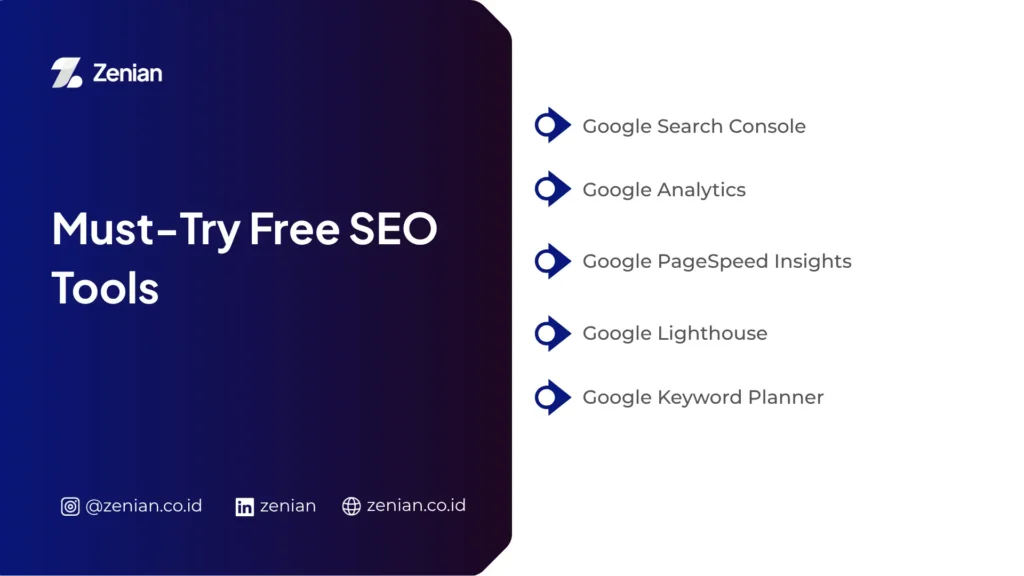
Must-Try Free SEO Tools
Free SEO tools are great for auditing your site without breaking the bank. While features might be slightly limited compared to paid tiers, these are perfect for baseline audits:
| Tool | Primary Function |
| Google Search Console | Essential for tracking organic health and seeing how Google views your site. |
| Google Analytics (GA4) | Helps you track visitor behavior, top pages, session duration, and traffic sources in real-time. |
| Google PageSpeed Insights | Delivers speed scores and performance fixes for desktop and mobile. |
| Google Lighthouse | An automated tool that evaluates performance, accessibility, best practices, and SEO. |
| Google Keyword Planner | Perfect for finding keyword ideas, search volumes, and competition data. |
| Ahrefs Webmaster Tools | A free Ahrefs tier that covers technical health scores, backlinks, and URL rankings. |
| Ubersuggest | Beginner-friendly UI offering site audits, keyword ideas, and traffic analysis. |
| Screaming Frog SEO Spider | A powerful crawler that uncovers broken links, duplicate content, and metadata issues (Free up to 500 URLs). |
Key SEO Performance Metrics to Monitor
Tracking these metrics routinely ensures your optimization efforts are actually moving the needle:
- Organic Traffic: The raw volume of visitors coming naturally via search results. Monitor this via Google Analytics to see if your strategy is paying off.
- Keyword Ranking: Your position in search engine results pages (SERPs) for specific terms. You can track shifts using GSC, Ubersuggest, or Ahrefs.
- Click-Through Rate (CTR): The percentage of searchers who actually click your link. High CTR means your titles and descriptions are compelling.
- Core Web Vitals: Measures loading performance, interactivity, and visual stability. A fast, responsive site ensures seamless indexing and better user retention.
- Domain Authority (DA) & Backlinks: Indicators of overall site authority. Building links from reputable, relevant sites strengthens your long-term SEO.
- Index Coverage & Crawl Errors: Ensuring Google can smoothly read and archive your vital pages without running into technical walls.
Tips to Improve Your Google SEO
Improving your rankings requires a holistic strategy that balances technical adjustments with high-value content and authority building:
- Optimize On-Page SEO: Write descriptive metadata, utilize clean heading hierarchies, and compress image files to keep pages lightweight.
- Create Content with Clear Search Intent: Solve the user’s problem instead of just stuffing keywords. Informative content drives higher dwell time and more natural shares.
- Speed Up Your Website: Minimize code, leverage caching, and optimize images to keep bounce rates low.
- Build High-Quality Backlinks: Prioritize organic link building (guest posts, high-value content) over spammy shortcuts. Quality always beats quantity.
- Run Regular SEO Audits: Use tools like Screaming Frog or Ubersuggest to catch broken links, duplicate content, and tech glitches early.
Optimize Your Website’s SEO with Zenian!
Keeping your website’s SEO in check ensures you stay top-of-mind for search engines. However, an audit is only as good as the strategy you execute afterward.
If you’re ready to flip organic traffic into actual business growth, PT Zenian Digital Lab is here to map out data-driven, long-term SEO strategies tailored specifically to your business goals and target growth.
Baca Juga: What is an SEO Article? Definition, Functions, and How to Create One